Learn with Cliprise

Master cinematic AI creation with in-depth guides for prompting, composition, models, and creative workflows.

Quick Start Guide

Your First 5 Minutes with Cliprise

From sign-up to first AI creation in under 2 minutes. Follow this simple 5-step guide to start generating professional AI content immediately.
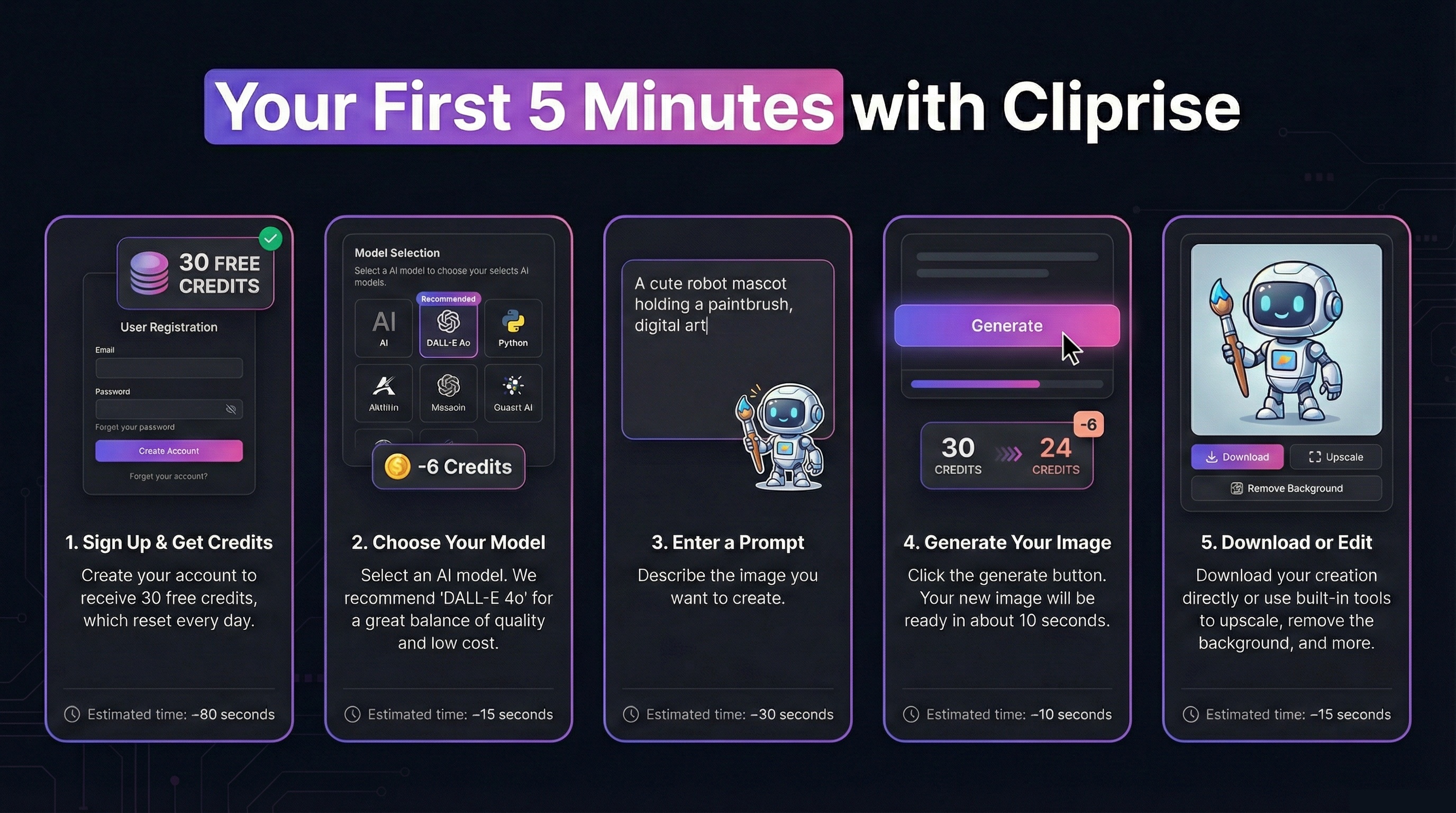
1

Sign Up

~80s

Create account & receive 30 free credits

2

Choose Model

~15s

Select AI model (DALL-E 4o recommended)

3

Enter Prompt

~30s

Describe what you want to create

4

Generate

~10s

Click generate and wait for magic

5

Download

~15s

Download or edit with built-in tools

Ready to Create Your First AI Image?

Sign up now and get 30 free credits to test any fast model. No credit card required, start creating in minutes.

⏱️ Estimated time to first creation: Under 2 minutes

How Creators Use Cliprise: Real Workflows

See complete step-by-step workflows for common use cases. Each workflow includes process breakdown and estimated credit costs for budget planning.
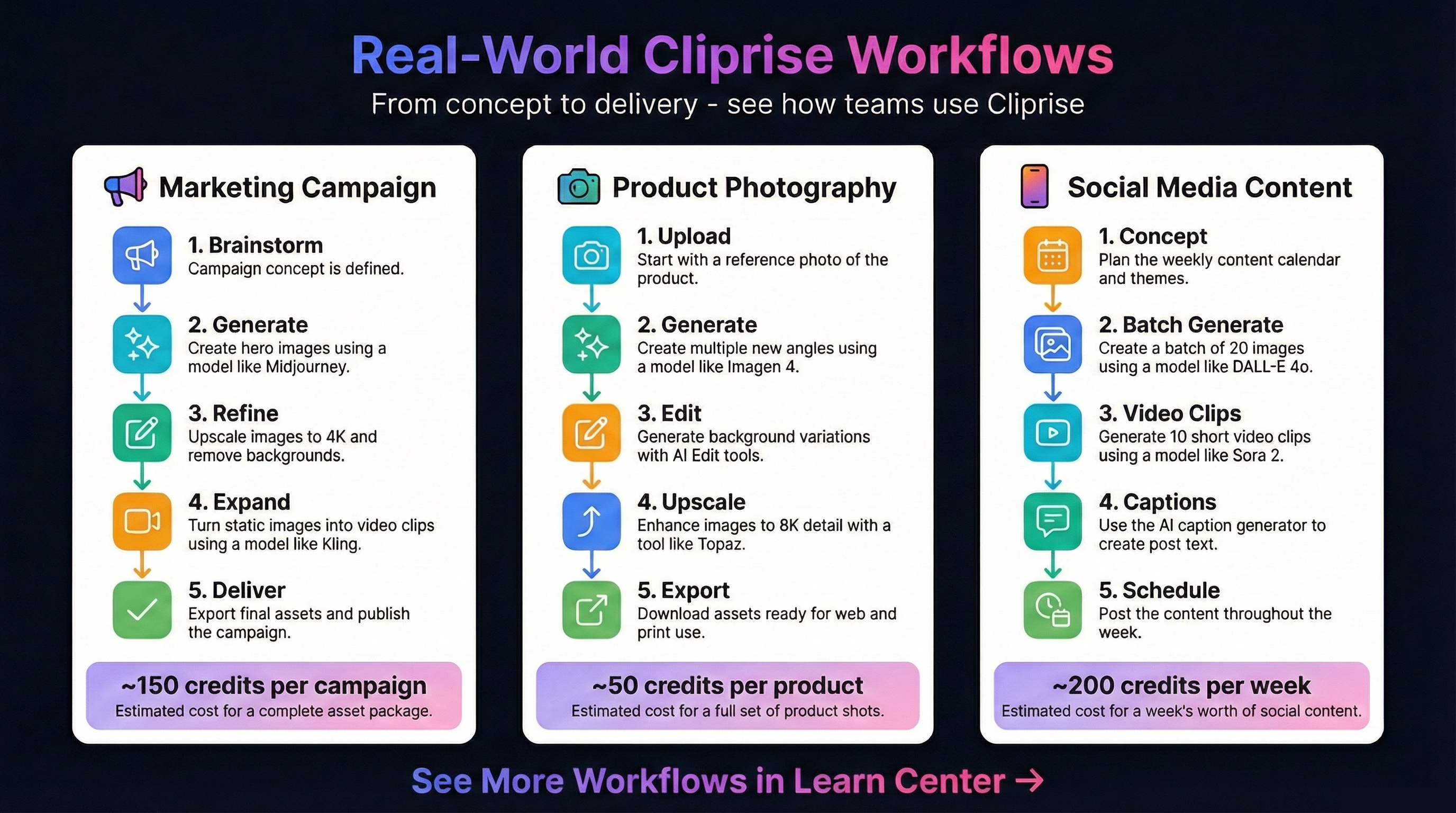
Marketing Campaign

≈150 credits per campaign

  1. 1.

    Brainstorm

    Define campaign concept & messaging

  2. 2.

    Generate

    Create hero images with Midjourney (15cr each)

  3. 3.

    Refine

    Upscale to 4K & remove backgrounds (19-37cr)

  4. 4.

    Expand

    Turn images into video clips with Kling (46-91cr)

  5. 5.

    Deliver

    Export final assets for web & print

Best Plan: Starter (900cr) = 6 campaigns/month

Pro Tip: Batch generate variations to find winners fast

Product Photography

≈50 credits per product

  1. 1.

    Upload

    Start with reference photo of product

  2. 2.

    Generate

    Create multiple angles using Imagen 4

  3. 3.

    Edit

    Generate background variations with AI tools

  4. 4.

    Upscale

    Enhance to 8K detail with Topaz (19-73cr)

  5. 5.

    Export

    Download assets for web & e-commerce

Best Plan: Pro (3,500cr) = 70 products/month

Pro Tip: Use Imagen 4 Standard for cost efficiency

Social Media Content

≈200 credits/week

  1. 1.

    Concept

    Plan content calendar & themes

  2. 2.

    Batch Generate

    Create 20 images with DALL-E 4o (120cr total)

  3. 3.

    Video Clips

    Generate 10 short clips with Sora 2 (11-15cr each)

  4. 4.

    Captions

    Use AI caption generator for post text

  5. 5.

    Schedule

    Post content throughout the week

Best Plan: Starter (900cr) = 4 weeks content

Pro Tip: Use fast models for high volume posting

Mobile Apps

Create AI Content On The Go

Professional AI image and video generation in your pocket. Learn how to master Cliprise mobile apps for iOS and Android.

Video Tutorials

Learn with Video

Watch comprehensive tutorials to master Cliprise AI in minutes

Tutorial
1:34

Cliprise Quick Tour - How to Generate AI Images & Videos in Seconds

A rapid 90-second tour of the Cliprise app, covering model selection, prompt-based generation, and the credit system.

Walkthrough
5:47

How Cliprise Works Behind the Scenes - Clara's AI Art Story

A story-driven walkthrough following a creator named Clara to demonstrate how to select models and use the token system effectively.

Educational Guide

Understanding the Credit System

Master how credits work in Cliprise. Learn about sources, priority flow, generation costs, and how to maximize your monthly allocation.
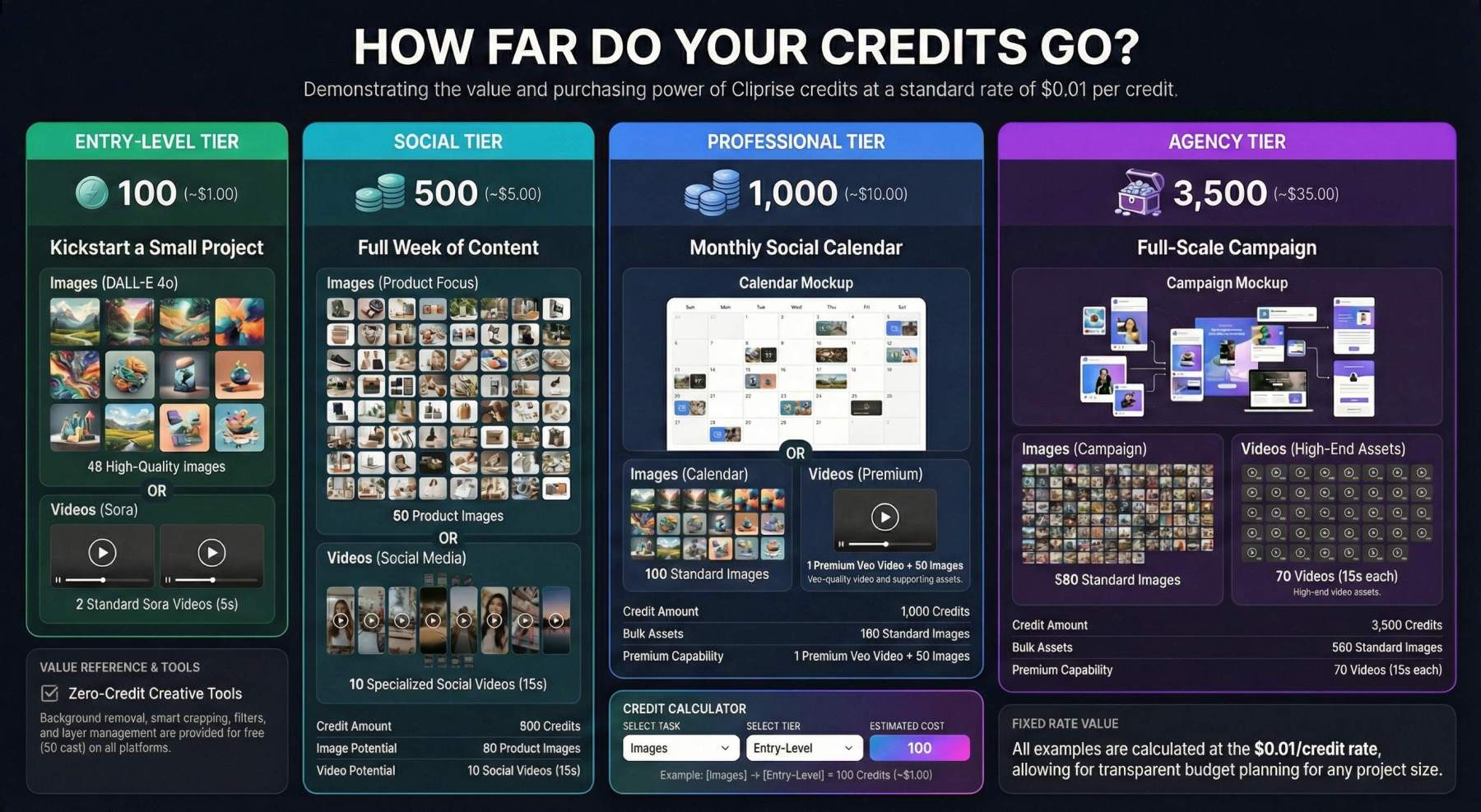
Credit Sources

  • Subscription: Monthly credits from your plan
  • Top-Ups: Purchase anytime, never expire
  • Daily Free: 30 credits/day on Free plan

Priority Flow

  • 1st: Uses subscription credits first
  • 2nd: Then uses top-up credits
  • 3rd: Blocks if all credits depleted

Key Rules

  • Credits never expire while account active
  • Automatic refunds if generation fails
  • Unified balance for all media types

Typical Generation Costs

6-15

Image Generation

  • • DALL-E 4o: 6 credits
  • • Imagen 4: 5-15 credits
  • • Flux Pro: 8 credits
  • • Midjourney: varies
9-900+

Video Generation

  • • Sora 2 Standard: 11-15 cr
  • • Kling Standard: 46-91 cr
  • • Veo 3.1 Fast: 37 cr
  • • Veo 3.1 Quality: 271 cr
4-73

Audio & Voice

  • • ElevenLabs TTS: 22 cr/1K chars
  • • Sound FX: 22 cr/min
  • • Speech-to-Text: 7 cr/min
  • • Audio Isolation: 22 cr/min

Pro Tip: Platform shows exact cost before you generate. Plan your monthly budget by estimating how many creations you need.

Experiment Freely with AI

Don't fear mistakes - AI thrives on experimentation. Learn how to iterate, explore, and discover amazing results.
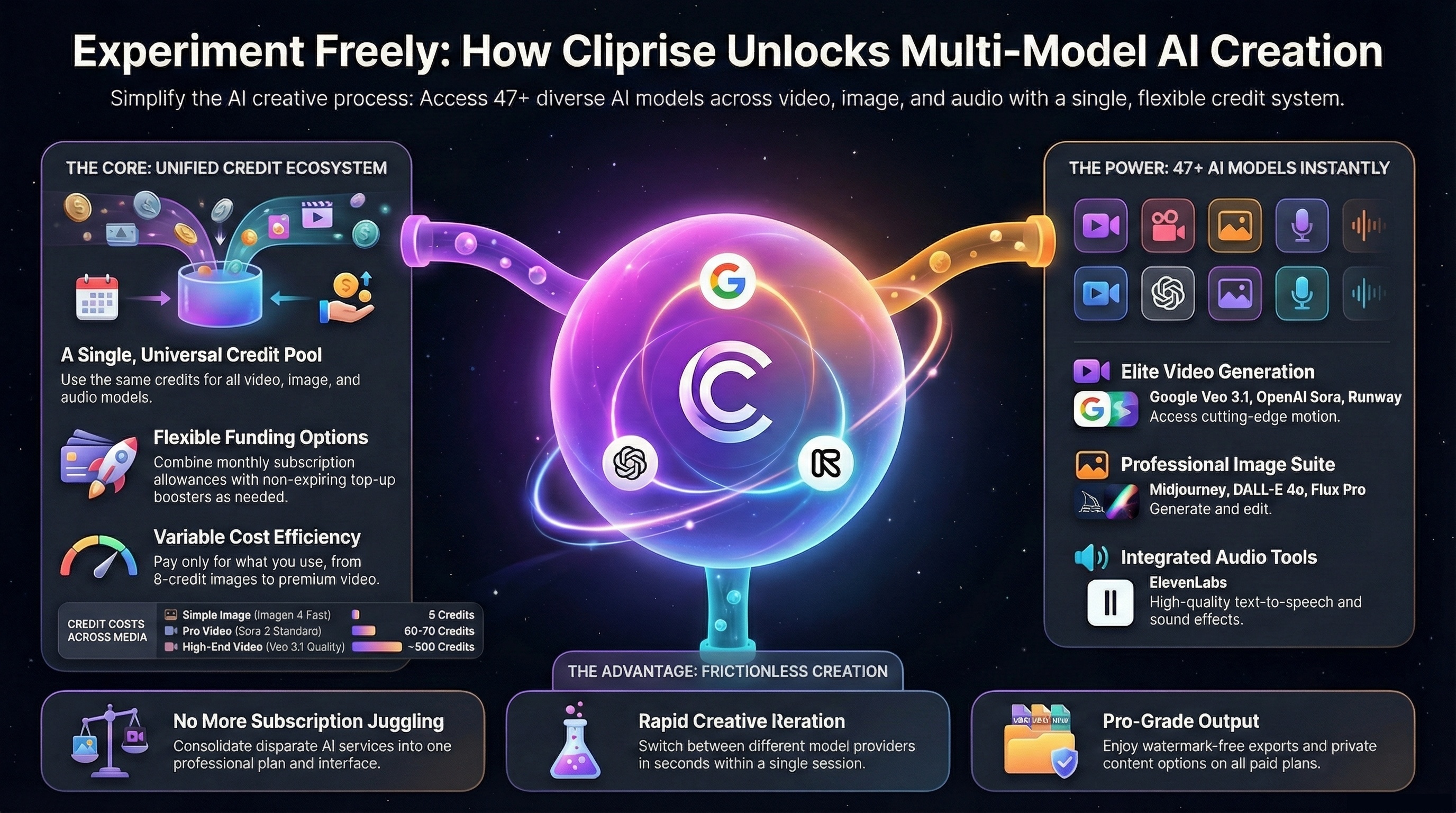
The Creative Explorer's Mindset

🎲 Try Different Models

Each AI model has unique strengths. Flux excels at realism, Midjourney at artistic styles, DALL·E at concepts. Experiment!

🔄 Iterate Quickly

Don't aim for perfection on the first try. Generate variations, tweak prompts, and refine. Your best work comes from iteration.

✨ Happy Accidents

Some of the best creative results come from unexpected AI outputs. Stay open to surprises and explore "mistakes."

📚 Learn as You Go

Every generation teaches you something. Save successful prompts, note what works, and build your creative toolkit.

💡 Pro Tips for Experimentation

  • Start broad, then narrow: Begin with simple prompts, then add details based on results
  • Use seed variations: Keep the same seed and only change one parameter to see its effect
  • Compare side-by-side: Generate multiple versions simultaneously to compare approaches
  • Mix and match: Combine styles, eras, and concepts in unexpected ways

Guides

Best AI for YouTube Thumbnails 2026: Ideogram, Flux 2, Midjourney — Tested

Best AI tools for YouTube thumbnails in 2026 compared: Ideogram v3 for text, Flux 2 for faces, Midjourney for gaming/style. Multi-model workflow + A/B testing guide.

9 min
Read Guide
Guides

ElevenLabs Speech to Text on Cliprise: Complete Guide to AI Transcription

ElevenLabs Speech to Text (Scribe v2) transcribes audio and video across 90+ languages with speaker diarization, timestamps, and keyterm prompting. How to use it on Cliprise.

8 min
Read Guide
Guides

ElevenLabs TTS on Cliprise: Complete Guide to AI Voice Generation

How ElevenLabs TTS works on Cliprise — voice selection, model differences, scripting for natural delivery, and where it fits in video and avatar production workflows.

10 min
Read Guide
Guides

Gemini Flash Image Models on Cliprise: Complete Guide

Gemini Flash image models — Gemini 2.5 Flash (original Nano Banana) and Gemini 3 Flash — bring Google's speed-optimized image generation and editing to Cliprise. How they work, when to use them, and where they fit relative to Nano Banana Pro.

7 min
Read Guide
Guides

GPT Image 1.5 on Cliprise: Complete Guide to OpenAI's Image Generation Model

GPT Image 1.5 is OpenAI's latest image model — up to 4x faster than its predecessor, with precise editing that preserves unchanged elements, strong text rendering, and native multimodal architecture. How to use it on Cliprise.

8 min
Read Guide
Guides

Grok Imagine on Cliprise: Complete Guide to xAI's Image Generator

Grok Imagine is xAI's image and video generation model — photorealistic output, strong instruction following, and image editing from the makers of the Grok AI system. How it works on Cliprise.

8 min
Read Guide
Guides

Hailuo 02: Complete Guide to MiniMax's Cinematic AI Video Model

Hailuo 02 from MiniMax generates 1080p video up to 10 seconds with physics simulation and cinematic quality. When to use it on Cliprise, what it does well, and how it compares to Kling and Veo.

9 min
Read Guide
Guides

Ideogram Character: Complete Guide to Single-Image Character Consistency

Ideogram Character generates consistent character variations from a single reference image — no LoRA training, no multiple reference photos. How it works on Cliprise and when to use it.

8 min
Read Guide
Guides

Ideogram Reframe: Complete Guide to AI Image Reframing on Cliprise

Ideogram Reframe extends and adapts existing images to new aspect ratios using outpainting — banner to poster, square to cinematic, Instagram to YouTube. How to use it on Cliprise.

7 min
Read Guide
Guides

Kling 2.1: Complete Guide to Kuaishou's Image-to-Video Model on Cliprise

Kling 2.1 from Kuaishou introduced start-and-end frame control for image-to-video generation — specify both the first and last frame, and the model generates the motion connecting them. Where it fits in the Kling family on Cliprise.

7 min
Read Guide
Guides

Nano Banana Pro: Complete Guide to Google's Flagship Image Model on Cliprise

Nano Banana Pro (Gemini 3 Pro Image) generates up to 4K images with reasoning-driven composition, multilingual text rendering, up to 14 reference inputs, and studio-quality editing controls. How to use it on Cliprise.

9 min
Read Guide
Guides

Qwen Image on Cliprise: Complete Guide to Alibaba's Open-Source Image Model

Qwen Image from Alibaba leads open-source image generation benchmarks with a 20B parameter architecture purpose-built for bilingual text rendering and precise image editing. How both Qwen Image and Qwen Image Edit work on Cliprise.

8 min
Read Guide
Guides

Runway Aleph: Complete Guide to AI Video Editing on Cliprise

Runway Aleph edits existing video footage through text prompts — adding, removing, and transforming objects, generating new camera angles, changing environments and lighting. The first AI model built specifically for video editing rather than generation.

9 min
Read Guide
Guides

Seedream 3.0: Complete Guide to ByteDance's Bilingual Image Model on Cliprise

Seedream 3.0 from ByteDance generates 2K images with bilingual English and Chinese text rendering, strong poster and layout composition, and fast generation. Where it fits in the Seedream family on Cliprise.

7 min
Read Guide
Guides

Seedream 4.5: Complete Guide to ByteDance's AI Image Model on Cliprise

Seedream 4.5 from ByteDance generates up to 4K images with multi-reference character consistency and sharp text rendering. When to use it vs Flux 2 and Midjourney on Cliprise.

9 min
Read Guide
Guides

Sora 2 Pro Storyboard: Complete Guide to Scene-by-Scene Video Planning

Sora 2 Pro Storyboard lets you plan AI video frame-by-frame, specifying what happens in each scene before generating. Up to 25 seconds, synchronized audio, and multi-scene control on Cliprise.

8 min
Read Guide
Guides

Topaz Video Upscaler: Complete Guide to AI Video Enhancement

Learn how Topaz Video Upscaler turns 480p AI drafts into export-ready 4K video, when to use it vs Topaz Image Upscale, and how it fits multi-model pipelines.

9 min
Read Guide
Guides

Veo 3.1 Fast: Complete Guide to Google's Speed-Optimized Video Model

Veo 3.1 Fast generates 1080p video in 30-45 seconds — twice as fast as Quality mode with a modest quality trade-off. When to use it, how it differs from Standard, and where it fits in creative workflows on Cliprise.

8 min
Read Guide
Guides

Veo 3.1 Quality: Complete Guide to Google's Highest-Fidelity AI Video Model

Veo 3.1 Quality is Google's highest-fidelity video generation mode — 4K output, spatial audio, and Ingredients to Video. When to use it over Fast, and how to get the most from it on Cliprise.

10 min
Read Guide
Guides

Wan 2.5: Complete Guide to Alibaba's Audio-Visual Video Model on Cliprise

Wan 2.5 from Alibaba generates video with natively synchronized audio — voice, ambient sound, and lip sync in one pass. How it compares to Wan 2.6 and where it fits in video production workflows on Cliprise.

7 min
Read Guide
Comparisons

DALL-E 3 vs Midjourney 2026: The Real Comparison

DALL-E 3 and Midjourney compared across prompt adherence, artistic style, text rendering, photorealism, and practical use cases. Both are available on Cliprise — here is what actually separates them and when to use each.

14 min
Read Guide
Guides

AI Art Maker 2026: Create Original AI Art with Midjourney, Flux 2, and More

How to create original AI art using the image generation models on Cliprise — model selection by visual style, prompting technique for artistic results, and practical applications for digital art, prints, social media, and commercial use.

12 min
Read Guide
Guides

AI E-commerce Product Photos 2026: From Generation to Marketplace-Ready Images

Create AI e-commerce photos on Cliprise with model selection, product prompts, marketplace specs, and end-to-end post-processing workflows.

12 min
Read Guide
Guides

AI Music Generator 2026: What AI Can and Can't Do for Music on Cliprise

What AI music generation tools actually do in 2026, what Cliprise offers for music production workflows (audio sync, lyric video, music video), and where the limitations are. Honest guide for musicians, creators, and producers.

10 min
Read Guide
Guides

AI Podcast Thumbnail Generator 2026: Cover Art and Episode Images on Cliprise

Create AI podcast thumbnails and cover art on Cliprise using Ideogram v3, Midjourney, and Flux 2 with consistent branding workflows.

10 min
Read Guide
Guides

AI Portrait & Headshot Generator 2026: Professional Photos Without a Photographer

How to generate professional AI portraits and headshots using Flux 2, Google Imagen 4, and Nano Banana 2 on Cliprise — model selection, prompting technique, and realistic expectations for LinkedIn photos, team pages, and profile images.

12 min
Read Guide
Guides

AI Voice Generator 2026: ElevenLabs TTS and Voice Tools on Cliprise

How AI voice generators work, what ElevenLabs TTS on Cliprise produces, when to use text-to-speech vs dialogue vs voice cloning, and practical applications for video creators, podcasters, and marketers.

11 min
Read Guide
Guides

AI YouTube Thumbnail Generator 2026: Ideogram, Flux 2, and Midjourney on Cliprise

Generate high-click YouTube thumbnails with AI on Cliprise using Ideogram, Flux 2, and Midjourney, with prompts and workflows for CTR-focused design.

11 min
Read Guide
Guides

How to Create an AI Avatar Video in 2026: Talking Head Guide on Cliprise

Create an AI avatar video on Cliprise by animating a portrait with clean audio for lip-synced talking-head results in minutes.

8 min
Read Guide
Guides

How to Create AI Images in 2026: Step-by-Step Guide for Beginners

Create AI images on Cliprise in minutes with model selection, beginner-friendly prompting, and simple controls for consistent results.

9 min
Read Guide
Guides

How to Generate AI Video in 2026: Step-by-Step Guide on Cliprise

Generate AI video on Cliprise step by step using the right model, clear prompts, and practical settings for usable first outputs.

10 min
Read Guide
Guides

How to Make AI Art in 2026: Models, Styles, and What Works on Cliprise

Learn how to make AI art on Cliprise with model-by-style guidance, practical prompt templates, and delivery workflows for real use.

9 min
Read Guide
Guides

How to Make an AI Music Video in 2026: Complete Workflow on Cliprise

Make an AI music video on Cliprise with Seedance, OmniHuman, and CapCut using a practical audio-synced workflow from concept to export.

9 min
Read Guide
Guides

How to Remove Background from AI-Generated Images in 2026

Remove AI image backgrounds on Cliprise with Recraft Remove Background, then prep clean transparent cutouts for e-commerce and POD use.

7 min
Read Guide
Guides

How to Upscale AI Images: From 1024px to Print-Ready in 2026

Upscale AI images on Cliprise from 1024px to print-ready resolution using Recraft Crisp or Topaz with a reliable delivery workflow.

7 min
Read Guide
Guides

How to Use Stable Diffusion Without a GPU: Hosted Alternatives in 2026

Use Stable Diffusion alternatives on Cliprise without GPU setup, with Flux 2 quality, faster workflow, and access to 45+ hosted models.

9 min
Read Guide
Guides

ByteDance OmniHuman: Complete Guide to AI Talking Head and Full-Body Video

OmniHuman turns one image and audio into lip-synced talking-head or full-body video. Learn setup, prompting, and when to use it vs Kling Avatar.

10 min
Read Guide
Guides

AI Sound Effects Generator: ElevenLabs Sound Effect on Cliprise

How to generate custom sound effects from text using ElevenLabs Sound Effect on Cliprise — prompt structure, use cases for video production, podcasting, and game audio, and what the model does and doesn't produce well.

10 min
Read Guide
Guides

Flux Kontext Guide 2026: Edit Any Image With Text — Backgrounds, Objects, and Style

How Flux Kontext on Cliprise works for AI image editing — changing backgrounds, objects, colors, and style in existing images using text prompts. Real capabilities, real limitations, and prompting examples for product, fashion, and commercial workflows.

11 min
Read Guide
Guides

Kling AI Avatar API: Complete Guide to Long-Form Presenter Video

Kling AI Avatar API turns a portrait and audio into presenter video up to 1 minute. Learn setup, multilingual workflows, and production use cases on Cliprise.

10 min
Read Guide

Ready to Try These Techniques?

Explore our 47+ AI models and start creating professional images, videos, and audio

Featured on Super Launch